
Integration to AWS External Key Service (XKS)
Background
AWS XKS (External Key Store) is a feature of AWS Key Management Service (AWS KMS) that allows you to use cryptographic keys stored in an external key management system with AWS KMS. It enables you to maintain control over your keys while leveraging AWS services that integrate with AWS KMS.
Source: AWS KMS XKS Proxy API Specification - Background
Architecture
The Eviden KMS integrates to AWS XKS and proposes a novel architecture (dubbed xksv2) that solves the traditional XKS performance issues without compromising on security.

The Eviden XKSv2 architecture is composed of the following components:
Eviden Confidential KMS
This is the Confidential Key Management System, deployed as IaaS, in the customer AWS tenant. It is responsible for managing the Key Encryption Keys (KEKs) wrapping the XKS keys in AWS KMS and for answering encryption and decryption requests from the AWS KMS.
To protect the KEKs, the Eviden KMS runs inside an Eviden VM on top of confidential computing machines. Eviden VM provides strong security and verifiability guarantees.
The Eviden KMS is deployed in AWS infrastructure, solving the XKS scaling problem, as it benefits from a stable high bandwidth network and can easily scale to reliably support large amount of transactions from the AWS KMS.
The Confidential KMS is available as a ready-to-deploy product from the AWS Marketplace.
HSM
The HSM is responsible for storing the Master keys and securing the Eviden KMS keys. It is deployed in the customer premises or offered as a managed service by Atos. See the HSM integration documentation for more details.
Deployment
-
Deploy an Eviden KMS in your AWS tenant. You can find the product on the AWS Marketplace and follow the deployment instructions in the product documentation.
-
Configure the KMS for use with AWS XKS by filling up the
aws_xks_configsection of the configuration file with the following values:[aws_xks_config] # set this to true aws_xks_enable = true # this is the region you Eviden KMS is deployed in aws_xks_region = "us-east-1" # keep this to this value aws_xks_service = "kms-xks-proxy" # used for sigv4. The values set here must match the values configured # when setting up the KMS as an external keystore for AWS KMS (see next step) aws_xks_sigv4_access_key_id = "AKIAIOSFODNN7EXAMPLE" aws_xks_sigv4_secret_access_key = "wJalrXUtnFEMI/K7MDENG/bPxRfiCYEXAMPLEKEY" -
Configure the KMS to act as an External Key Store for AWS KMS. Follow the instructions in the AWS documentation to create an External Key Store.
-
Create an external key in AWS KMS and specify the key store created in the previous step as the key store for the key.
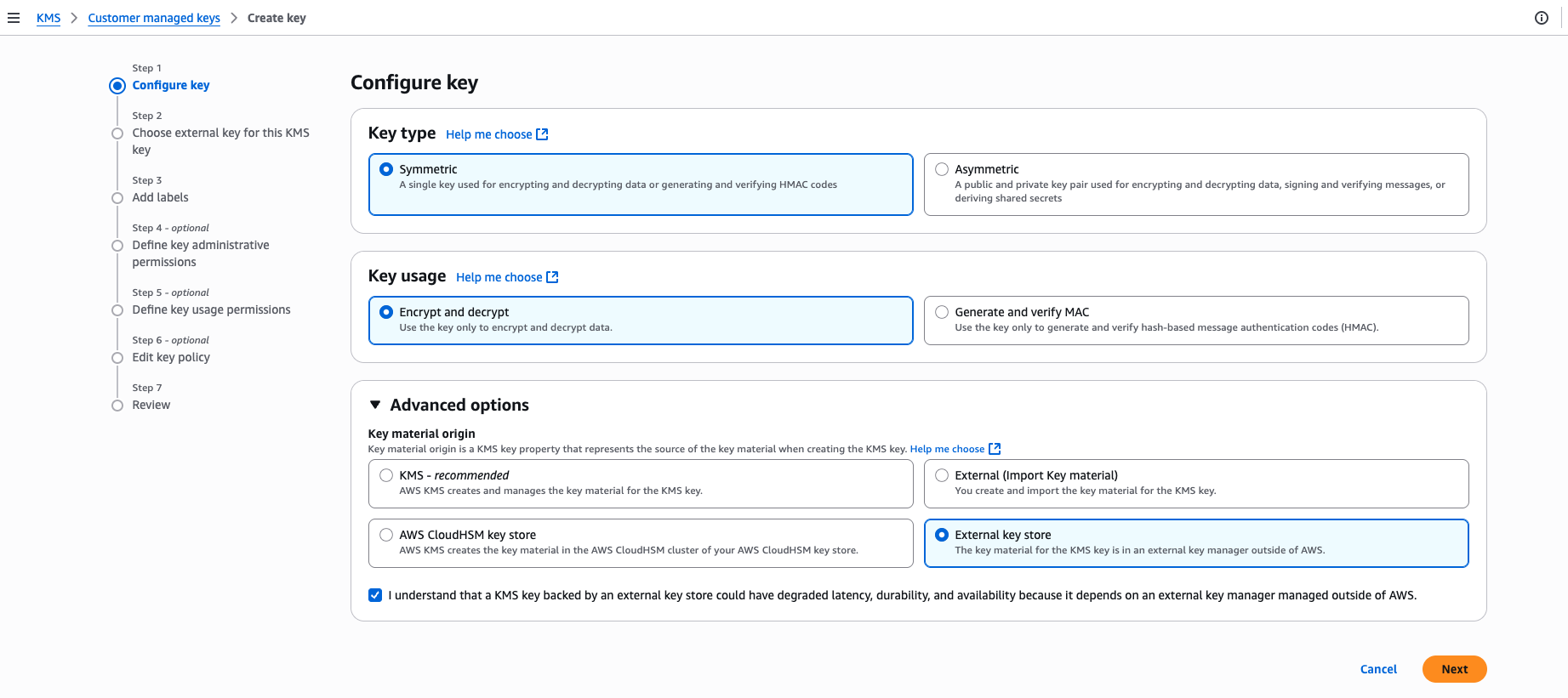
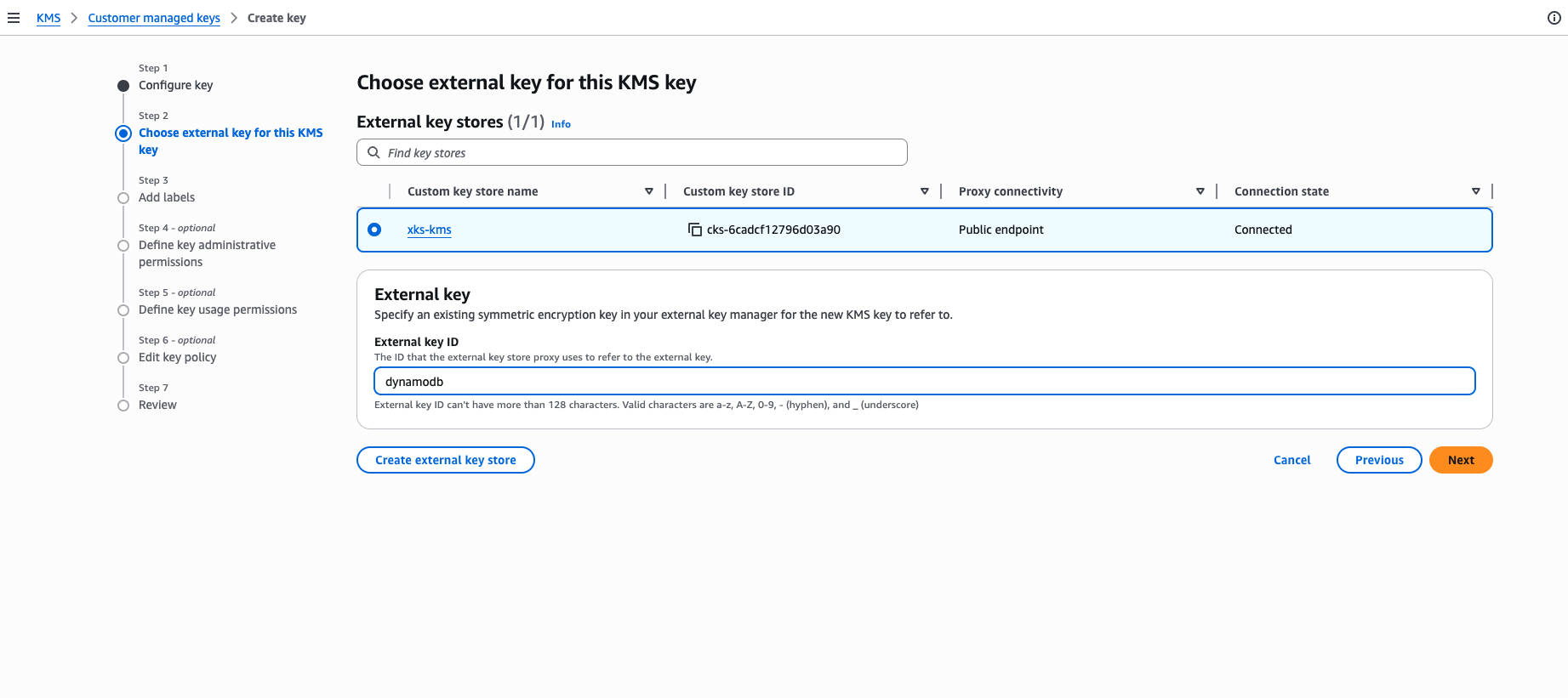
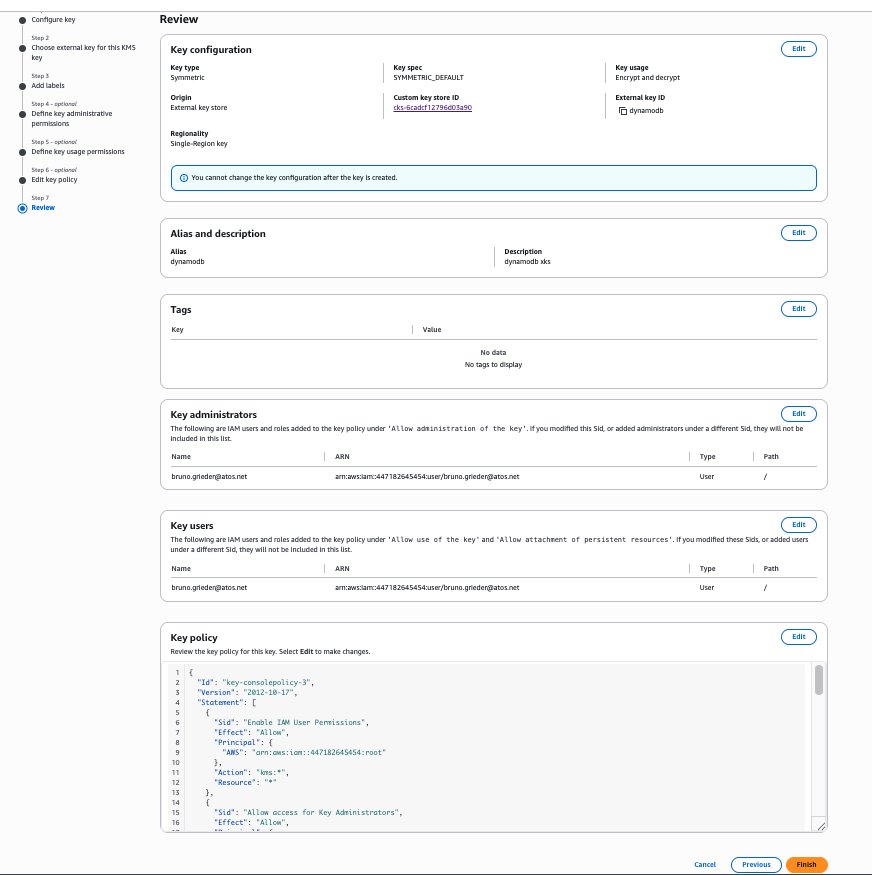
-
Authorize AWS principals to use the key.
The KMS authenticates every XKS request from AWS KMS using the shared SigV4 credentials configured above (
aws_xks_sigv4_access_key_id/aws_xks_sigv4_secret_access_key). This signature is the trust boundary, in line with AWS's model where the AWS key policy and IAM are the source of truth for which principals may use the key.XKS keys are used internally through a dedicated, reserved KMS service identity, so any AWS principal whose request is correctly signed can use the key. You do not need to create or maintain a per-principal (per-ARN) permission entry on the KMS for each IAM role, and the numerous or dynamic roles common with AWS SSO or Control Tower work without additional configuration.
The keys remain owned by the KMS
default_username, so you keep full administrative control over them (listing, revocation, destruction and export) from the CLI and the Web UI. The XKS service identity itself is granted onlyEncrypt,DecryptandGetAttributes, so the XKS endpoints can never revoke, destroy or export key material.The
awsPrincipalArnsent by AWS KMS is recorded in the KMS logs for auditing only and is never used as an authorization gate.Keys created by an earlier KMS version are updated automatically when the server starts, so no manual action is required when upgrading.
Monitoring and lifecycle management
AWS never calls back into the XKS proxy to list, monitor, rotate, revoke, or destroy key
material — the XKS proxy API
spec
only defines GetKeyMetadata, Encrypt, Decrypt, and GetHealthStatus. Scheduling
deletion or on-demand rotation of a CMK from the AWS console only changes state on AWS's
side; it never reaches this KMS. Lifecycle management of the external key material is
therefore entirely your operational responsibility.
A Crypto Officer must be designated to handle this. Configure a real, credentialed
identity (a TLS certificate CN or OIDC subject matching default_username) as a Crypto
Officer (crypto_officer.users / privileged_users) so that a human operator can, through
the normal ckms CLI or Web UI:
- List/monitor XKS keys —
Locateby theaws-xkstag,GetAttributes. - Revoke or destroy XKS keys that are no longer needed.
XKS keys cannot be rotated in place. The KMS ReKey operation always assigns a new
internal unique identifier, but AWS KMS always calls the XKS proxy back with the original
external key id configured when the CMK was created — it has no mechanism to learn about a
new one. Attempting ReKey (manually or via the auto-rotation scheduler) on an aws-xks
key is therefore rejected with an explicit error. To rotate the cryptographic material
behind an external key, create a new external key (new CMK with a new external key id)
in AWS KMS, migrate consumers to it, and destroy the old one through this Crypto Officer
identity once it is no longer in use.
Do this deliberately: an installation with an empty crypto_officer.users list has no one
who can reach these keys this way, and the server logs a startup warning in that case. Never
attempt to authenticate as the reserved AWS XKS service identity itself — it is intentionally
unreachable through any normal authentication path (TLS, OIDC, SPIRE, UI session) and is only
ever used internally to answer SigV4-signed requests from AWS KMS. Granting it a real
credential would let anyone holding it bypass AWS's SigV4 trust boundary entirely. See
crate/server/src/routes/aws_xks/README.md for the underlying authorization model.