
Covercrypt Post-Quantum Encryption with Access Policies
Covercrypt is a post-quantum public key encryption scheme that allows encrypting data for a set of attributes in order to provide fine-grained partitioning.
Covercrypt is being developed in partnership with the ENS cryptographic Lab , has been published at the ESORICS 2023 conference and is being standardized at ETSI. Covercrypt is coded in Rust and the source is available on GitHub.
Unique Decryption Keys with Access Policies
Consider the following 2 policy axes, Department and Country which data are partitioned by the following
attributes:
Department,Finance,Marketing,Human Res.andSalesCountry,France,UK,SpainandGermany
Each pair (Department, Country) constitutes one of the $4^2=16$ data partitions.
When defining the Policy for these partitions, Covercrypt offers the ability to selectively choose which partition is protected by post-quantum cryptography.
With Covercrypt, the encryption key is public. Encrypting systems (A browser, a mobile phone, a Spark process, data engineering applications, ETLs, etc...) do not have to be secured and can directly hold the key, relaxing constraints on the infrastructure. The public key can encrypt for any partition defined by the policy.
Decryption keys can decrypt a subset of the partitions defined by the policy.
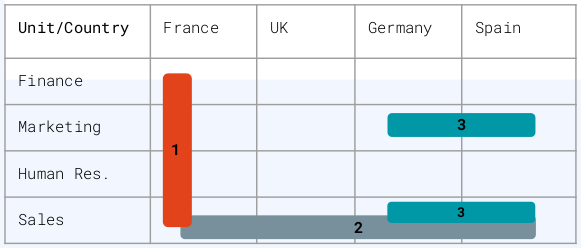
Key 1 can decrypt all the France data with the following access policy:
Country::France
Key 2 can decrypt all the Sales data with the following access policy:
Department::Sales
Key 3 can decrypt the Marketing and Sales data from Spain and Germany with the following access policy:
(Department::Marketing || Department::Sales) && (Country::Spain || Country::Germany )
User keys are truly unique: even though two users have the same access policy, their key fingerprints will be different. This makes it much easier for forensic cyber teams to trace a key leak.
Policy axes can be hierarchical. Suppose three levels on a Confidentiality axis: Medium, Secret,
and Top Secret. This hierarchical axis will let users with a Top Secret attribute in their key access policy
decrypt Medium, Secret, and Top Secret data – whereas users with a Medium attribute will only be able to
decrypt Medium data.
Finally, attributes can be rotated providing forward secrecy on selected partitions only.
The libraries are available in multiple languages to facilitate encryption close to the data source and decryption close to the decryption target, including mobile devices and browsers.
This section describes the Application Level Encryption API, the Encrypted Search API is on this page.
Supported Languages
The application-level encryption scheme is called Covercrypt. It is open-source and written in Rust. For the cryptographic documentation and implementation details, please check its GitHub repository.
Unless low-level programming in Rust, implementers should use Covercrypt through the various cloudproof_xxx user
libraries:
- cloudproof_java: the Cloudproof Java Library,
- cloudproof_js: the Cloudproof Javascript Library,
- cloudproof_python: the Cloudproof Python Library,
- cloudproof_flutter: the Cloudproof Flutter Library.
- cloudproof_spark: the Cloudproof Spark Library.
All these libraries are open-source and available on GitHub
The user libraries all contain extensive tests, and it is highly recommended to start by hacking those tests.
Installing the Libraries
It is possible to create keys using the libraries; however, it is more likely that you will want to store them in a KMS. Please go to the KMS documentation to fetch and run a local KMS.
The library is published on npm: simply install the library in your package.json
npm install cloudproof_js
The library contains web assembly for cryptographic speed
Creating a Policy
A policy defines the space of rights that are used for encryption. It is composed by a set of axes that contain attributes.
For example, the following two axes are divided into four attributes and define a policy:
Department:Finance,Marketing,Human Res.,SalesCountry:France,UK,Spain,Germany
A combination of axis attributes is associated to a partition. For example
Department::Finance && Country France points to a valid partition under the above
policy.
An access policy is defined by a set of partitions. It can be written as a boolean expression of axis attributes:
(Department::Marketing || Department::Sales) && Country::France
In the following demo, we will create a policy that combines two axes, a
security level, and a department. A user will be able to decrypt data only
if it possesses a key with a sufficient security level and the correct
department.
Policy Axes
Security Level Axis:
The first policy axis is the Security Level. It is hierarchical and is
composed of 3 levels: Protected, Confidential, and Top Secret. Since this
axis is hierarchical, when a user is granted access to a given level, it is
granted access to all lower levels. The attributes must be provided in
ascending order.
Department Security Axis:
The second policy axis is the Department axis. It is composed of 3 values:
HR, MKG, and FIN. This axis is not hierarchical: granting access to an
attribute of this axis to a user does not give access to any other attribute.
Hybridization
Covercrypt offers the possibility to hybridize the classic asymmetric scheme with the winner of the NIST post-quantum algorithm selection process: Kyber. Hybridization can be applied with granularity since it is specified at the attribute level. A partition corresponding to a combination of attributes with at least one hybridized attribute is hybridized. Any data encrypted for a hybridized partition will result in a hybridized ciphertext.
Rotations
Rotations allow to refresh the value of a given partition. The maximum number of creations of partition values is set in the policy.
Generating the Master Keys
The master authority possesses the master key pair:
- a master secret key which is used to generate user keys;
- and a public key which is used for encryption. Since it cannot decrypt, the public key can be freely distributed to encrypting systems.
Keys can be generated locally using the WASM code
Encrypting Data
Data is encrypted using the Public Key and an encryption policy that determines the target partitions of the ciphertext.
Anyone who has access to the Public Key can encrypt data, however, only users possessing user keys with the right access policy can decrypt the ciphertext.
A Covercrypt ciphertext is the concatenation of an encrypted header and an encrypted content.
- The encrypted content is a plaintext symmetrically encrypted using an ephemeral secret key (i.e. a random key generated on the fly).
- The header is the encapsulation of the ephemeral key for a given encryption policy, concatenated with some optional metadata. The metadata, if present, is symmetrically encrypted using the same ephemeral key.
Header and encrypted content can be generated separately using the various APIs. Check the inline documentation of the various languages and the test suites for details.
The code below shows the encryption of 3 messages with 3 different encryption policies targeting 3 different partitions.
Encrypting data is done using the encrypt() function which calls the WASM function.
Generating User Decryption Keys
User Decryption Keys are generated from the Master Private Key using access policies.
Let us create 2 users with different access policies to illustrate their effect.
User Decryption Keys can be generated by calling the local WASM
Decrypting Ciphertexts
The confidential marketing user can successfully decrypt a protected marketing message:
.. however, it can neither decrypt a marketing message with higher security:
... nor decrypt a message from another department even with lower security:
As expected, the top-secret marketing financial user can successfully decrypt all messages
Rekeying keys
At any time the Master Authority can generate new keys for any access policy.
When that happens future encryption of data for a given access policy cannot be decrypted with keys that have not been "refreshed".
It is best to perform rekeying using the KMS to automatically refresh each user key if it is active in the KMS (the key has not been revoked).
rekeying all keys having access to "Department::MKG"
This operation will rekey all keys with access to Department::MKG.
It is also possible to rekey all keys with a precise access policy like Department::MKG && Security Level::Protected.
You successfully rekeyed the master keys and all active user keys with access to marketing data.
See more
See more
creating a new confidential marketing message
decrypting the messages with the re-keyed key
The automatically re-keyed confidential marketing user key can still decrypt the "old" protected marketing message, as well as the new confidential marketing message.
Pruning keys
After a rekey operation, the affected keys will store both the old and the newly generated subkeys to be able to decrypt old and new ciphertexts. If you only need access to the new ciphertexts, you can save space by pruning these keys.
By performing the pruning operation using a KMS, the active user keys will be automatically synced with the master keys.
WARNING: This operation will permanently remove access to old ciphertexts for the pruned access policy.
pruning all keys having access to "Department::MKG"
The master and user keys will only keep the latest subkeys associated to the access policy Department::MKG.
Pruned keys will only be able to decrypt ciphertexts generated after the last rekey operation for the corresponding access policy.
Policy editing
The Policy in use by a KMS can be modified on the fly through various operations:
-
Rename attributes: purely visual modification of the Policy.
-
Add new attributes to an existing Policy dimension. ONLY supported by unordered dimension.
-
Disable attributes: soft removal of an attribute, prevents the encryption of new messages for this attribute while keeping the ability to decrypt existing ciphertexts.
-
Remove attributes: will permanently remove the ability to use this attribute in both encryptions and decryptions. ONLY supported by unordered dimension.
The masters keys and users keys will automatically be updated accordingly by the KMS.
Rename attributes
Specify the existing attribute Dimension::Name and the desired name for the attribute NewName.
The resulting attribute will be Dimension::NewName.
rename attribute "MKG" to "Marketing"
The rename operation is purely visual and will not impact the existing user keys and ciphertexts.
From now on, be sure to use the new attribute name when encrypting data or issuing new user keys. New messages can still be decrypted by marketing user keys created before the renaming and vice versa.
Add attributes
Add a new attribute to an unordered dimension, specify the attribute to create with Dimension::Name and whether to use hybridized keys.
add new attribute "Department::R&D"
Create a non-hybridized attribute R&D in the existing dimension Department.
The newly added attribute can be used to encrypt and generate keys as seen previously.
See more
See more
encrypt a message for the newly created attribute
This message will be readable by users with access to the R&D department and the security level protected or above.
generate a user key with access rights for this attribute
This user can decrypt messages from the R&D department OR the financial department, with a security level of confidential or below:
the new user key can decrypt the R&D message
Disable attributes
Remove the ability to encrypt new message for an existing attribute using the KMS. Existing messages associated to the disabled attribute will remain readable.
disable attribute "Department::R&D"
Prevent the generation of new R&D messages while keeping access to existing ones.
Encryption of new R&D messages is no longer possible.
Remove attributes
Completely removes an attribute from the policy and from all associated keys in the KMS.
WARNING: Encryption and decryption for this attribute will no longer be possible after this operation. We strongly recommend to make a local copy of the master secret key beforehand, otherwise messages whose encryption policy does not contain any other attributes belonging to the dimension of the deleted attribute will be lost.
remove "Department::R&D"
All user keys in the KMS associated with this attribute will automatically loose the ability to decrypt for this attribute.
Ciphertexts for which the only Department access was R&D are now unreadable by all KMS keys.
The Whole Code
The code used in this documentation as well as more examples can be found for each library:
If you want to see full code of usage of cloudproof_js, please check the examples directory in Github.